

Example
A chart configured on “Year 2023” will remain fixed on 2023 even if the user selects “Last 7 days” in the period selector.
The period filter is the entry point for every analysis in Biron. It is mandatory and always active, by default via the period selector at the top of the page.
Biron filters data based on the reference date of each View. Depending on the View, this reference date can be:
Selecting “Last 7 days” therefore limits the data to records whose reference date falls within that interval:
The period selector is located at the top of each dashboard. It defines the period applied to all charts in the dashboard.

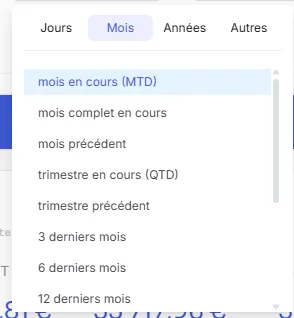
Two input modes are available:
To the right of the selector, the granularity (Day, Week, Month, Quarter, Year) defines the time unit of charts broken down by date.
This filter is dynamic and non-persistent: it applies only for the current session and does not affect other users.
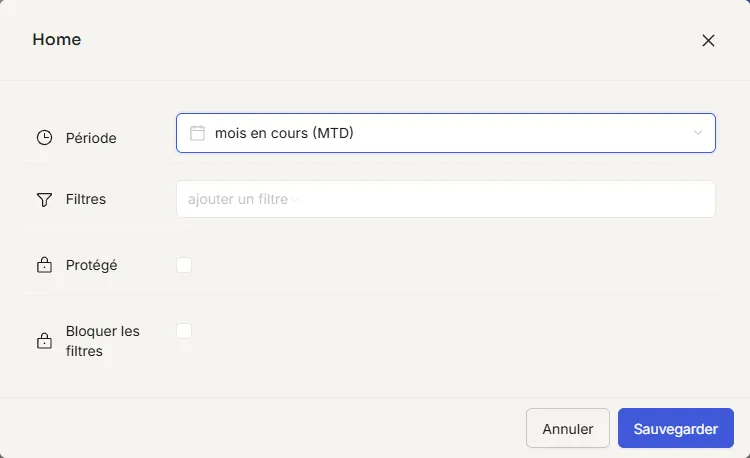
Users with the Manager role can configure a default period on each dashboard. It is applied when the dashboard is opened by all users, but can be changed at any time.
To do this, enable Edit mode (switch at the top right of the dashboard), then click the Settings button in the dashboard toolbar. See Configuring dashboard settings.
It is possible to fix the period of a chart independently of the period selector. This configuration is reserved for writer users and is done in the chart configuration.
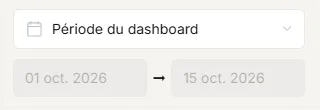
A chart with a static period ignores the global period selected by the user. It always displays its data over the range defined in its configuration.
Example
A chart configured on “Year 2023” will remain fixed on 2023 even if the user selects “Last 7 days” in the period selector.
The period filter is always applied first. Dimension filters (global or chart-level) are then applied on top, on the data already restricted by the period.
To learn more about how dimension filters work, see the article Dimension filters.